A Bitly page appeared before the redirect, so I built a brand short-link tool
When an independent store needs to shorten a long URL, the usual first move is a ready-made service such as Bitly. That was my starting point too, until I found that it did not always send people straight to the product page.
In one situation, a visitor opened the short link, saw a Bitly page first, and only then continued to the destination. I do not know which conditions caused that interstitial page, but it makes the link feel worse and can make people question whether it is safe.
- The path the visitor experienced: a brand sends a link -> a Bitly interstitial page -> a product page.
That pushed me toward a different setup: a brand-owned short-link subdomain, a backend I control, and public links that go directly to product pages. Once the basic redirect worked, I added three requirements. A printed QR code had to keep working if its target changed. Each creator needed an individual short code and attribution parameters. And deleting a link had to start with archiving it, so a link already sent out could not disappear by accident. AI built the additional features around those requirements.
This is for cross-border ecommerce operators, independent-store owners, sellers, and small team leads. It shows how repeated questions changed the boundaries of a short-link tool, then gives you a link-choice table and a way to reconcile attribution.
What did the setup buy me first?
As of August 2026, Bitly’s official annual pricing listed Core at $120 a year and Growth at $348 a year. A custom branded domain was included in Growth. This tool uses a subdomain of an existing domain and currently fits within the free tiers of Cloudflare Workers and D1, so the added infrastructure bill is $0. Compared with paying for the branded-domain requirement, that removes about $348 a year.
That figure covers subscription cash only. It does not include development time, ongoing maintenance, or domain renewal. If nobody on the team can maintain it, the saved subscription can quickly come back as debugging time and outages.
| What I gained | What changed compared with a third-party short link |
|---|---|
| About $348 saved each year | Current low usage stays within free tiers, so I do not buy an annual plan for a branded domain |
| Data in my own database | I choose exports, backups, and retention instead of working within a plan’s historical-data window |
| Fully customizable short links | Short codes, destinations, UTM parameters, reporting definitions, archive rules, and backend access can follow the business |
| Stronger brand recognition | I can use one entry point, such as go.brand.com, so visitors see the brand domain instead of a random third-party short link |
| Easier-to-read creator links | Different creators can receive a code such as go.brand.com/kol5off, which shows the partner and offer in the link itself |
| The brand owns the first screen | A short link can go directly to a product page rather than passing through a third-party interstitial page |
The subscription saving was only one benefit. I could consolidate external entry points under go.brand.com, turning the short link itself into a brand asset. For creator work, a code such as go.brand.com/kol5off is easier to recognize, remember, and say aloud than a random string. The short code identifies the entry point. Actual attribution still needs reconciliation with UTM parameters, click data, and discount codes.
If you are deciding whether to build one, you can give the following prompt to AI. It asks about business conditions before proposing a system, rather than jumping straight to code.
Help me decide on and design a brand short-link system
At first, one 302 was enough
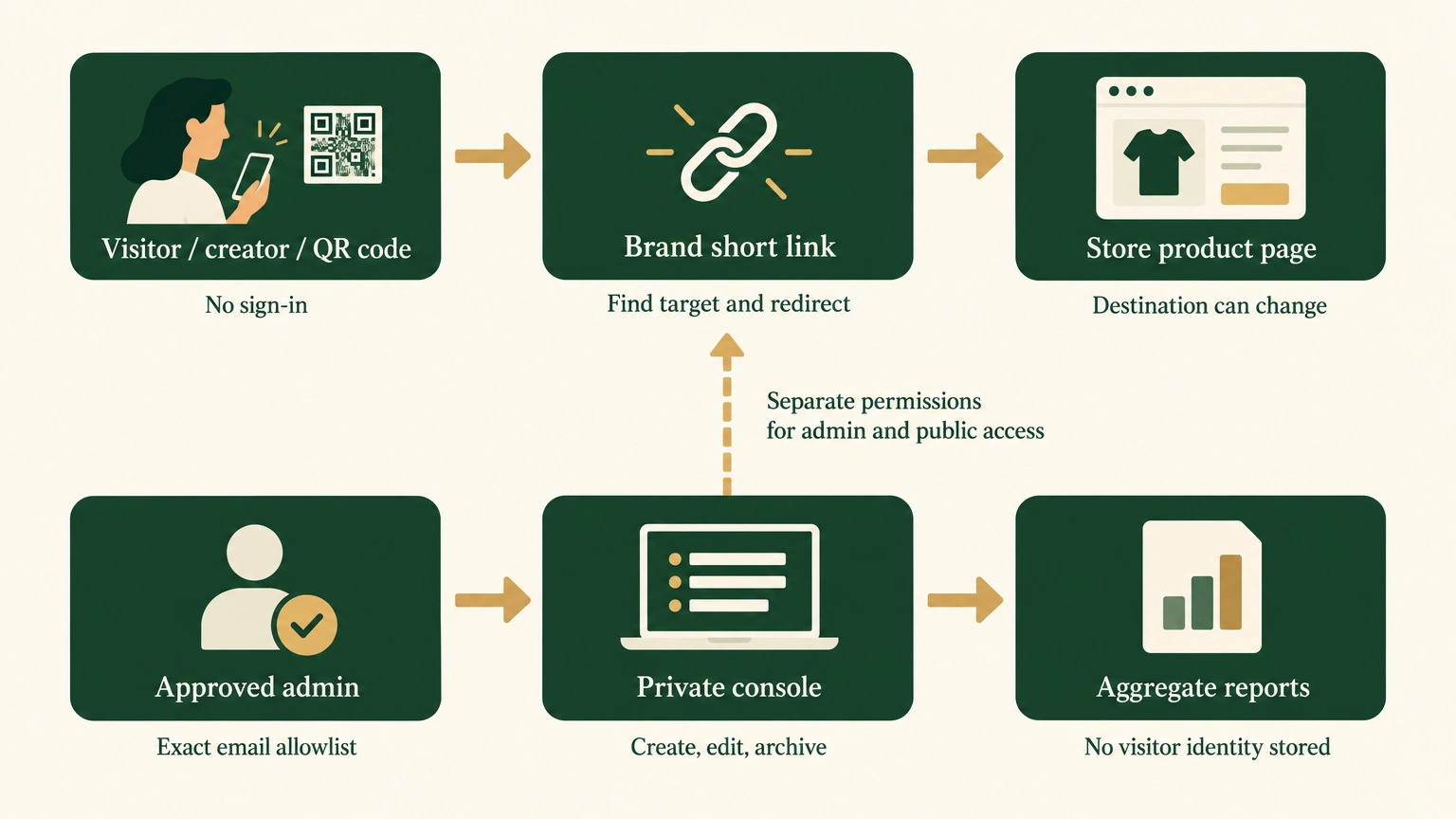
I set a few constraints for one of my Shopify stores: use the brand’s short-link subdomain, keep public links open to anyone, restrict the console to an exact email allowlist, do not expire links automatically, and skip CSV exports and a complex account system.
Shopify is the ecommerce platform that hosts product pages, carts, and checkout. A 302 means a temporary redirect on the web. Here, the short code stays in place like a forwarding number that keeps its number while its destination can change in the console. The application can retain that forwarding rule for a long time; the 302 itself still means a temporary redirect.
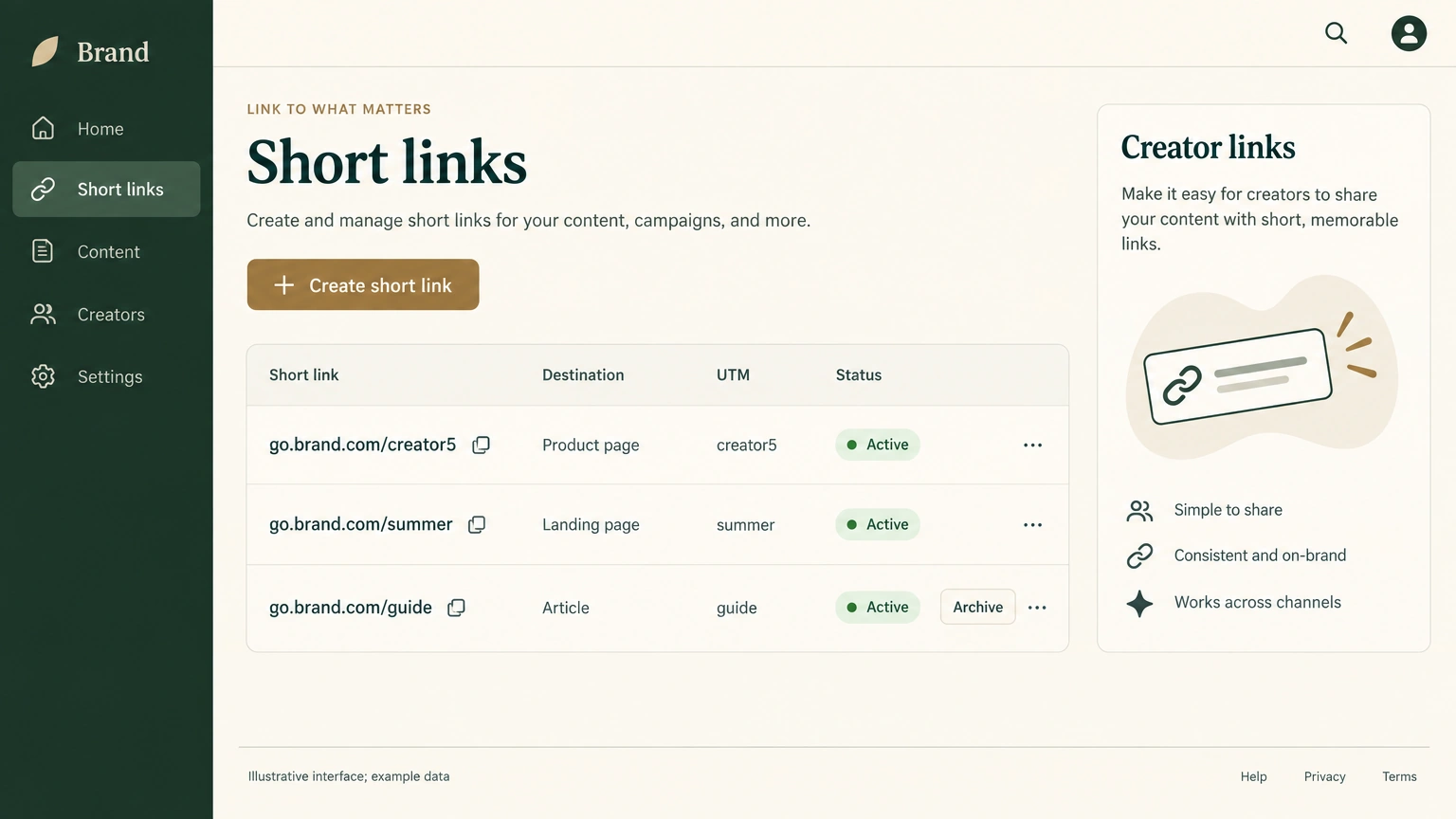
Illustrative interface; example data. It replaces the original sanitized local demonstration. On mobile, the complete image scales to fit the content width.
I set requirements, added constraints, kept asking questions, and approved decisions. AI handled research, design, coding, testing, deployment, and verification.
Each question added another boundary
QR codes changed what “permanent” meant first. Put a stable short link in the QR code, then change the destination product page later. Permanent only means the application has not set an expiry. The domain, account, redirect service, database, and destination page still need to exist.
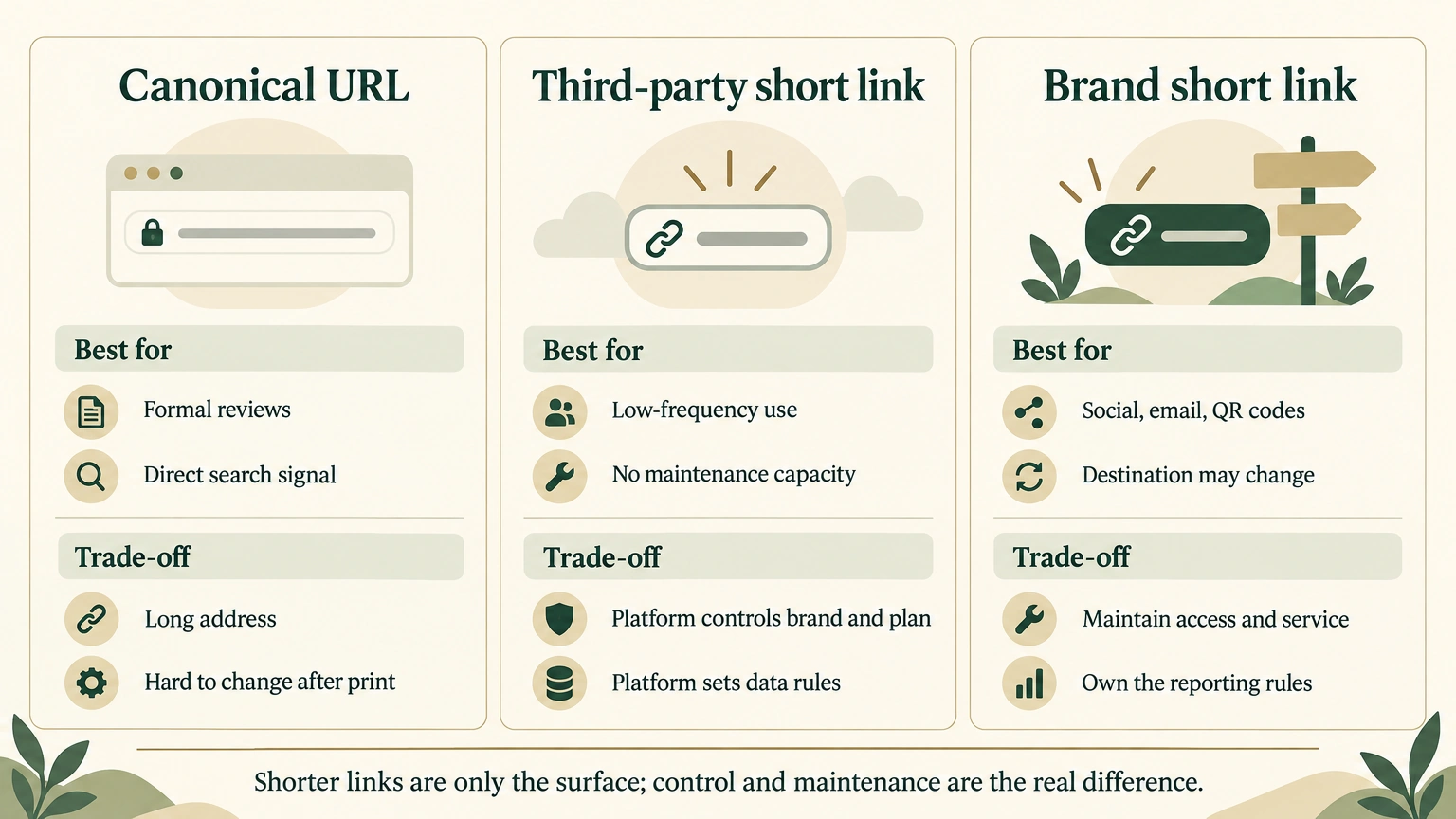
SEO changed the link decision too. SEO is how search engines interpret page relationships and link signals. Adding a separate short-link subdomain does not alter main-site pages, canonical URLs, or content, so it does not automatically take away the authority the main site has already earned. But a new external link that passes through a 302 may not pass a signal to a product page as directly as a canonical URL. Formal reviews on independent sites should therefore use canonical URLs first. YouTube, social posts, email, and offline QR codes fit brand short links better.
| What I kept asking | How the product changed |
|---|---|
| Can a QR code change after it is printed? | Keep the short code stable and edit only the destination |
| Can a link be permanent in an absolute sense? | State the dependencies instead of promising absolute permanence that does not exist |
| Should creators use canonical URLs, Bitly, or brand short links? | Choose by search value, brand presentation, and whether the destination may need to change |
| How do I reconcile YouTube creators? | Give each creator a distinct short code, add UTM parameters to the destination, and pair it with a distinct discount code |
| Should click reporting capture everything? | Collect only aggregate data that is enough to judge a channel |
| How should extra links be cleaned up? | Archive first and reserve permanent deletion for a second layer |
| How can other people enter the console? | Extend the exact email allowlist while keeping public redirects open |
These boundaries did not all appear before work started. The question changed from “can it redirect?” to “who can change it, what data does it collect, and can we reverse a mistake?” My evaluation changed with it. I started measuring the value of building it through control and risk boundaries, not the number of features.
Why not just use Bitly?
Established services such as Bitly are ready to use and need less maintenance. Their reporting and bot filtering do not need to be built from scratch. The precise capabilities still depend on the plan and its definitions at the time. For a small team with few links, no printed QR codes, and no need to set its own data rules, an established service is usually the better value.
I built my own because the brand attribution, permission rules, and data-retention rules needed to stay under my control. The short link carries the brand, the destination can change, and reporting stays in my infrastructure. The trade-off is that I own maintenance, monitoring, and access configuration.
Three forms of tracking should not become one number:
- UTM parameters are channel tags on the landing page. They indicate which creator, platform, and campaign brought a visit.
- Short-link click records show how many requests reached the redirect layer. That can include social previews, email security scans, and bots.
- Discount codes appear on the order side. They show which orders used a creator’s offer, but they miss people who forgot the code or bought on another device.
The three layers can only be reconciled. They cannot be combined into an absolutely accurate user journey. Short-link clicks show the redirect entry point. UTM parameters show whether an analytics tool recognized a channel. Discount codes show whether an order used the matching benefit. When the three conflict, flag the record for review instead of forcing one number to decide a creator commission or the next advertising budget.
Reporting came in, but visitor profiles stayed out
I asked whether the system could track clicks, countries, and devices. AI eventually added daily, country, device, and bot-flag aggregates so I could compare raw requests with requests after obvious bots were filtered.
The system stores aggregate results only. It does not store IP addresses, full browser identifiers, referrers, device fingerprints, or visitor identities. A store can record how many people entered today without building a file on every passerby. Aggregate data still carries risk, so the console remains limited to exact email addresses. This was traffic analysis, not an excuse to build visitor profiles.
Filtered clicks exclude only obvious bots. They are not real people. Treating raw clicks as human traffic can overestimate a creator’s result and send more budget in the wrong direction.
During development, AI ran into several errors that looked similar but had entirely different causes:
- Different permission tokens controlled the redirect service, database, domain, and console access. A single 403 only meant that the current credential lacked that permission.
- The production custom domain once rewrote the Host header of a local request, which made the local console return 401. AI separated that production assumption with an independent local configuration.
- One test assertion had the wrong destination-address format, and another hard-coded a mock country. The failed expectation was the problem, not product logic.
- Two Wrangler processes shared one runtime and did not exit on time when they ran in parallel. Running them sequentially restored normal behavior.
- An OAuth session and a local proxy both reported errors at once. AI checked public health status and the main-site response, then confirmed that the live service had no outage.
Readers do not need to copy those commands. The transferable action is to separate product behavior, tests, permissions, the local environment, and the live service, then change the layer supported by direct evidence.
Why archive before deleting?
One-click deletion is convenient in a console and dangerous for external links. Once a link has gone to a creator or into a QR code, an accidental permanent deletion can send posts, email, and printed material to a 404 at the same time.
No accidental deletion happened in this case. When I asked for a delete button, I asked about the consequence first and chose two cleanup layers. Archiving removes a link from the default list while its public redirect keeps working. Permanent deletion appears only in the archive area and requires the full short code as confirmation.
Team permissions followed the same approach. When AI updated the Access policy, meaning the console access rules, it read the current settings first, added only the email selector, then read the settings again to confirm other fields had not changed. That supports the claim that this update changed the minimum fields and was checked for idempotence. It does not prove that every cloud policy is safe to write back in the same way.
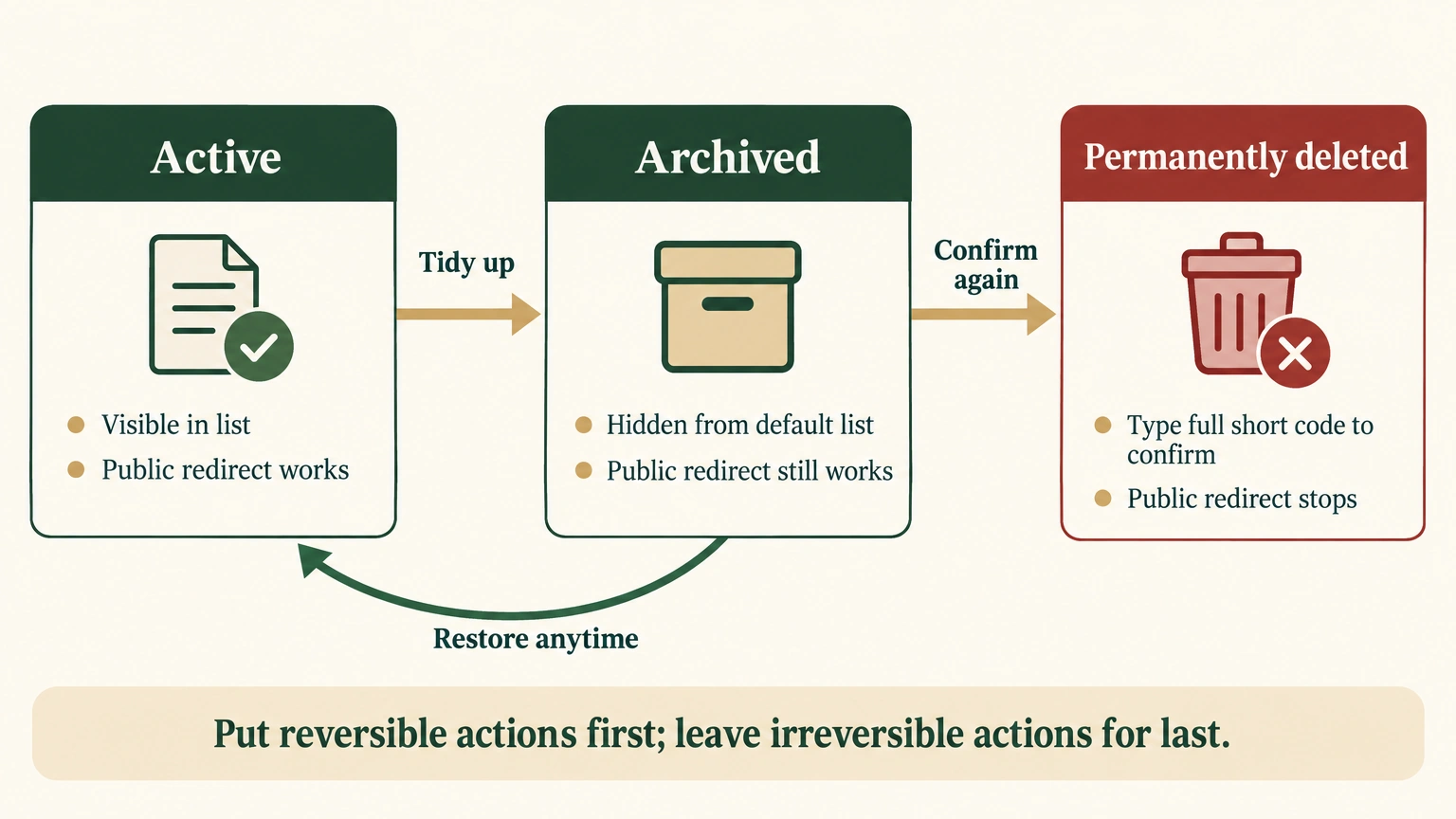
Archiving gives a team room to change its mind. It also separates tidying a console from ending an external commitment. A few extra clicks on an irreversible action cost less than a QR code that suddenly stops working.
How should an independent-store team choose a link?
| Use case | First choice | Why |
|---|---|---|
| Formal review on an independent site, where search value should go directly to the product page | Canonical URL | One fewer redirect and the most direct page relationship |
| YouTube, social posts, email, and direct messages | Brand short link + UTM parameters + a distinct discount code | Short, branded, editable, and available for layered reconciliation |
| QR codes on packaging, trade-show materials, and manuals | Brand short link | The destination can change after print |
| Infrequent use with no development or maintenance capacity | An established service such as Bitly | Fast to launch, with ready-made reporting and bot filtering |
Before starting, check four things: whether the link will be printed or distributed for a long time, whether the destination may change, whether the team needs control over data retention, and whether someone can maintain the domain and redirect service. When the first three are weak, a canonical URL or an established service is simpler. If nobody can maintain the system, do not build it.
Building is worth comparing only when long distribution or an editable destination matters and someone is willing to maintain it. Even then, begin with public redirects, a private console, editable destinations, and archiving. Collect only the reporting that can change decisions about orders, advertising, and partnerships. Cutting characters from the address is easy. The boundaries and maintenance responsibility decide how long the short link remains useful.